Development environment: Docker, CMake presets, and CLion
This guide describes three independent building blocks for a reproducible and efficient Antares Simulator development environment, and then shows how to combine them:
- A Docker image as a toolchain — a reproducible compiler and tooling environment.
- CMake presets — saved, shareable configure and build parameters.
- CLion as an IDE — which can consume both of the above.
Each of the next three sections (1–3) can be read on its own. Section 4 shows how to combine them inside CLion, and sections 5–6 cover build caching and vcpkg.
1. Using a Docker image as a toolchain
A Docker image gives every developer the same compiler, CMake, and tooling versions, independently of the host system.
1.1. Build the Docker image (example: clang)
From the project root:
cd docker/clang
docker build -f Ubuntu22-04-clang-toolchain.dockerfile -t antares/clang:latest .
1.2. Start a container
docker run -it antares/clang:latest bash
You can then follow the developer guide as usual, inside the container.
Drawbacks:
- You need to download the source and dependencies inside the container.
- You lose your work when exiting the container (unless you commit the container or copy files out).
1.3. Mount your local source code and dependencies
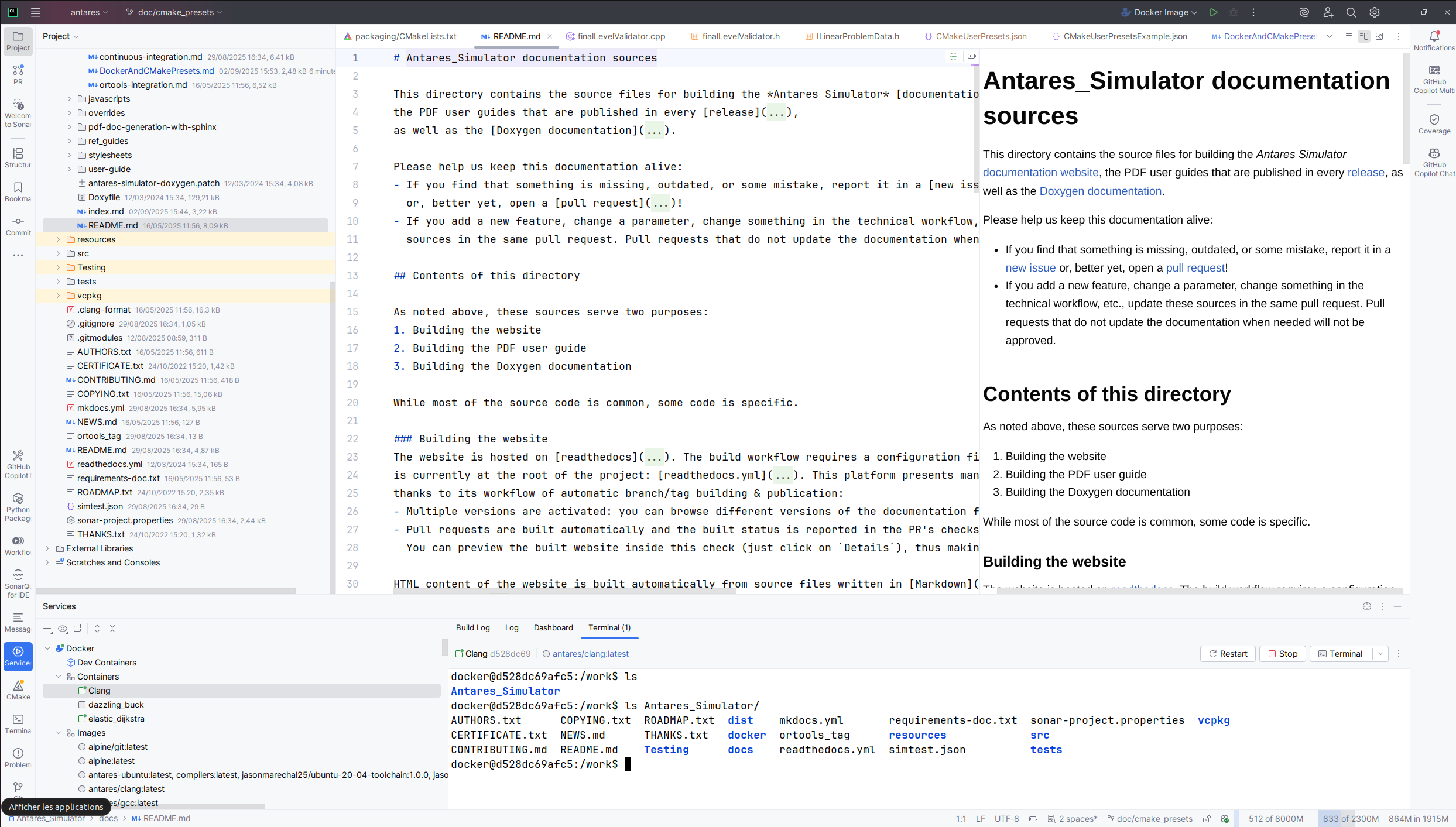
To work with your local (host) source code and dependencies, mount them as volumes. This way, changes made in your IDE are immediately visible in the container.
Example:
sudo docker run -it \
  -v "$PWD:/work/Antares_Simulator" \
  -v /path/to/ortools:/work/ortools \
  antares/clang:latest bash
- Replace
/path/to/ortoolswith the path to your local ortools directory. - Now,
/work/Antares_Simulatorand/work/ortoolsin the container point to your host files. - You can configure and build as usual; just point
CMAKE_PREFIX_PATHto/work/ortools.
Local = on your host (your computer).
Remote = inside the Docker container.
1.4. Advantages and drawbacks
- Advantage: You keep your work and dependencies persistent, and can use your favorite editor on the host.
- Drawback: File permissions and line endings may differ between host and container.
2. Using CMake presets
CMake Presets are a convenient way to save and share configuration and build parameters for CMake. They are especially useful in command line workflows to avoid repeating options, and to centralize default parameters across developers. They also let you easily switch between different build configurations or environments. For more information, see the official documentation.
- The default presets are available in
CMakePresets.json(versioned, shared). - Custom presets should be placed in
CMakeUserPresets.json(not versioned, user-specific). Example configurations are provided inCMakeUserPresetsExample.json.
When using Docker, make sure the paths in your presets (for example CMAKE_PREFIX_PATH or cache directories) match the
container's filesystem rather than the host's — see section 4.
2.1. Command line usage
The project provides CMakePresets.json and CMakeUserPresets.json in the src/ folder. To configure the project with
a preset:
cmake --preset=default
To list available presets:
cmake --list-presets
3. Using CLion as an IDE
CLion consumes the same CMake presets described above, and can build either with a local toolchain or through a Docker toolchain (see section 4). To work on Antares Simulator in CLion:
- Open the
src/folder (the CMake project root) in CLion. - Choose a toolchain under File > Settings > Build, Execution, Deployment > Toolchains — a local toolchain, or a Docker one.
- Select a CMake preset under File > Settings > Build, Execution, Deployment > CMake. In CLion, presets replace filling in the CMake options and build options manually.
- Configure, build, and run from the IDE.
See the CLion CMake presets documentation for more details.
4. Combining: a Docker toolchain and presets in CLion
CLion can use a Docker image as its toolchain and drive CMake presets entirely from the IDE, without relying on command line workflows. This combines all three building blocks into a reproducible, isolated environment that leverages build caching.
See the official JetBrains documentation, and start the Docker service first.
Step 1: Create a Docker toolchain
Follow the official JetBrains documentation: Create a Docker toolchain
- Go to File > Settings > Build, Execution, Deployment > Toolchains.
- Click the + button and select Docker.
- Choose the Docker image you want to use (e.g.,
antares/clang:latest, built in section 1). - Set up the CMake, C, and C++ compilers as detected in the container.
- Set the Make/Ninja executable if needed.
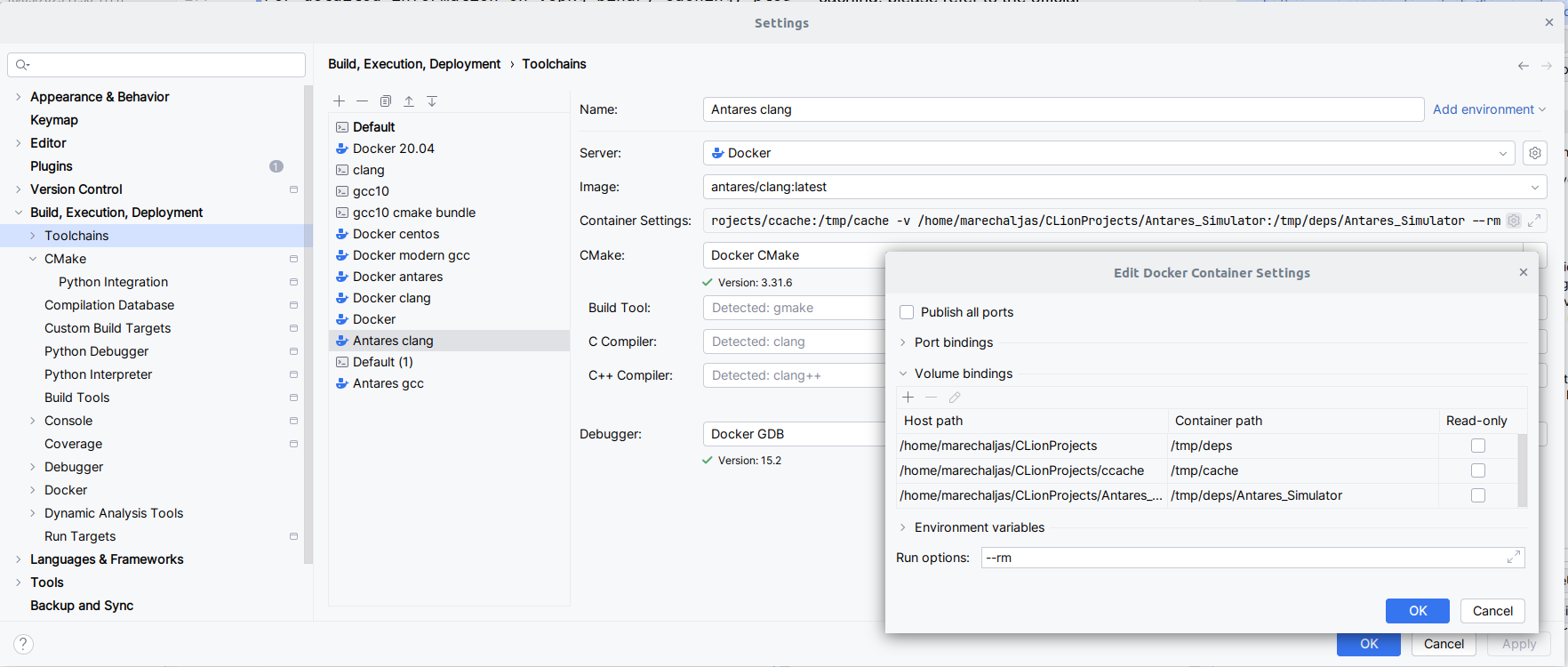
Step 2: Set up mounting points
To persist build output and caches across container runs, configure volume mounts. In the Docker toolchain settings, add these as Bind mounts. Example:
- Host:
/path/to/Antares_Simulator→ Container:/work/Antares_Simulator - Host:
/path/to/_build→ Container:/tmp/build - Host:
/path/to/ccache→ Container:/tmp/deps/ccache - Host:
/path/to/vcpkg_cache→ Container:/tmp/deps/vcpkg_cache
This ensures that your build artifacts and caches are preserved between sessions and container restarts. See section 5 for more on caching.
Step 3: Select a CMake preset
- In CLion, go to File > Settings > Build, Execution, Deployment > CMake.
- Select the desired CMake preset (e.g.,
default). - Make sure the paths in the preset match the mount points configured in your Docker toolchain.
With this setup, you can configure, build, and run Antares Simulator entirely within CLion, using Docker for a reproducible environment and leveraging build caching for fast iteration.
How CMakeUserPresetsExample.json is used
A example CMake preset is provided as docs/developer-guide/CMakeUserPresetsExample.json. You may copy it to the root
of the repository and rename it to CMakeUserPresets.json.
The configurePresets section in CMakeUserPresetsExample.json sets up environment variables and cache paths to
optimize builds inside Docker:
- ortools and sirius dependencies are mounted in
/tmp/deps/and referenced viaCMAKE_PREFIX_PATH. - ccache is stored in
/tmp/deps/ccacheand enabled withCMAKE_CXX_COMPILER_LAUNCHER=ccacheandCCACHE_DIR. - vcpkg cache is stored in
/tmp/deps/vcpkg_cache/and configured withVCPKG_BINARY_SOURCESandVCPKG_INSTALL_OPTIONS.
Example from the preset:
"environment": {
"VCPKG_ROOT": "../vcpkg",
"VCPKG_BINARY_SOURCES": "clear;files,/tmp/deps/vcpkg_cache/binary-cache,readwrite",
"CCACHE_DIR": "/tmp/deps/ccache",
"VCPKG_INSTALL_OPTIONS": "--x-buildtrees-root=/tmp/deps/vcpkg_cache/buildtrees;--x-packages-root=/tmp/deps/vcpkg_cache/packages"
},
"cacheVariables": {
"CMAKE_PREFIX_PATH": "/tmp/deps/ortools_9.13-rte1.1_cxx_ubuntu-22.04_static_sirius;/tmp/deps/sirius",
"CMAKE_CXX_COMPILER_LAUNCHER": "ccache"
}
These paths must be mounted as Docker volumes (Step 2) to persist build output and caches across sessions.
Note (CLion limitation): CLion requires the build directory to be inside the source folder. While it is cleaner to keep build output outside (e.g.,
/tmp/build), you must ensure the build directory is within the source tree for full IDE integration.
5. Build output caching
To speed up rebuilds and avoid unnecessary recompilation, you can use complementary strategies.
5.1. Persisting build output with Docker volumes
By mounting a host directory as a volume in your Docker container, you can persist build artifacts (such as the CMake build directory, ccache, and vcpkg cache) across different container lifetimes. This avoids losing build output when the container is removed.
Example:
docker run -it \
  -v "$PWD:/work/Antares_Simulator" \
  -v "$PWD/_build":/tmp/build \
  antares/clang:latest bash
cmake --preset=default -B /tmp/build
5.2. Using ccache
ccache is a compiler cache that stores previously compiled object files to speed up subsequent builds.
- Set the following variable at configure time or in a preset to use
ccache:- Variable:
CMAKE_CXX_COMPILER_LAUNCHER=ccache - Cache directory:
CCACHE_DIR=/tmp/deps/ccache
- Variable:
- Make sure the cache directory is persistent (see above) to benefit from caching across container runs.
docker run -it \
  -v "$PWD:/work/Antares_Simulator" \
  -v "$PWD/_build":/tmp/build \
  -v "path/to/a/folder/ccache":/tmp/deps/ccache \
  antares/clang:latest bash
export CCACHE_DIR=/tmp/deps/ccache
cmake --preset=default -B /tmp/build
5.3. vcpkg caching
For detailed information on vcpkg binary caching, please refer to the official documentation:
In this project, vcpkg binaries are typically stored in /tmp/deps/vcpkg_cache/binary-cache and caching is configured
via the VCPKG_BINARY_SOURCES and VCPKG_INSTALL_OPTIONS environment variables in your CMake presets or Docker
environment. This allows reuse of binaries and avoids unnecessary recompilations. See the links above for advanced usage
and troubleshooting.
See example presets in CMakeUserPresetsExample.json.
6. vcpkg
For information on installing and using vcpkg with Antares Simulator, please refer to:
7. Tips and best practices
- Modify or add your own presets in
CMakeUserPresets.json(not versioned). - For reproducible builds, use the shared presets in
CMakePresets.json. - Ensure cache paths are persistent if you use Docker.
For any questions or issues, consult the official documentation or contact the project maintainers.